Why your converted bank CSV shows the wrong year (December–January statements)
Published 28 September 2026 · by Tekiba
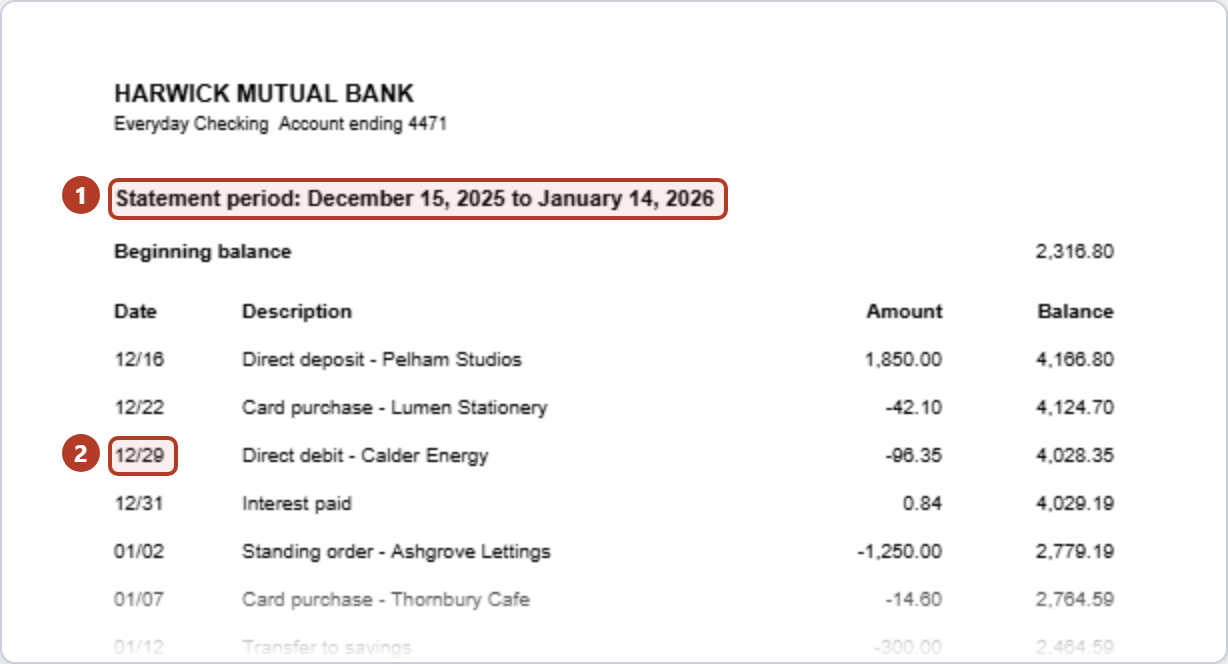
Because 12/29 has no year in it, and a statement running from December into January covers two. A converter has to fetch the year from elsewhere on the page; fetch one year for every row and half the statement lands twelve months out. LedgerDrop takes the year from the statement period printed on the page and tries each date with that period's years to place it inside it. When no period is printed, it falls back to a year printed beside the word “Statement” or “period” — and that is the case to check by hand.
Where the year is on the page
-
The period. The only place both years appear: a December date here is in 2025, a January date in 2026.
-
A date without its year.
12/29on its own could be any year; next to the period it can only be 29 December 2025, since 29 December 2026 is after the statement ends.
Not every statement leaves the year off. Bank of America's guide to reading its statement shows a sample whose heading reads “for July 1, 2012 to July 30, 2012” and whose transactions are dated like 07/20/12, year and all.
How LedgerDrop picks the year
In order:
A printed period. It looks for a range such as
December 15, 2025 to January 14, 2026,15 December 2025 through 15 January 2026,2025-12-15 to 2026-01-14or12/15/25 - 01/14/26. Each date without a year is tried with the start year, then the end year, and keeps the first that lands inside the period. A date that fits neither —02/01here — gets the start year and falls outside the period; step 3 below catches it. A period with its year printed only at the end, such asDec 15 - Jan 14, 2026orStatement period 12/15 - 01/14/2026, gives its start that year, or the year before when the start comes later in the calendar than the end. This year-at-the-end form is looked for only in the statement's heading, above the table, and its numeric form needs a label such as “Statement period”.Only a statement or closing date. A line such as
Statement Date January 14, 2026orClosing Date 01/14/26gives the end and no start. Each date gets the year that puts it on or before that day, so12/29is 2025.Neither. Then a year written as part of a date after “Statement for”, “Statement period”, “Statement date”, “closing date” or “billing cycle” in the heading is given to every date that lacks one — never one after “since”, “copyright”, “©” or “established”, so “Member since 2019” dates nothing. This is the weak case: one year for every row. A statement headed
Statement for January 2026whose rows start in December gives the December rows 2026 — a year late. The page shows no period when this happens, which is how you can tell; where the dates jump by over half a year, it says so.No such year. Rows are not given a guessed year. They are left out, and a note above the table counts them and quotes up to three, each as having “a date that could not be placed on the calendar”.
A two-digit year.
12/30/99takes the century nearest the printed period: on a statement for 2026 it is 1999, not 2099. With no period printed, 70 to 99 are read as the 1900s and 00 to 69 as the 2000s.
Which number is the month and which the day is settled separately, for the whole statement: LedgerDrop counts the dates that can only be read one way, such as 16/04, and lets them decide; on a tie, or with none, month first. A date that is no real day one way round is read the other. Amounts are not counted: an earlier version counted 20.01 as a date and could turn 01/05 — 5 January — into 1 May, fixed in September 2026.
What it writes
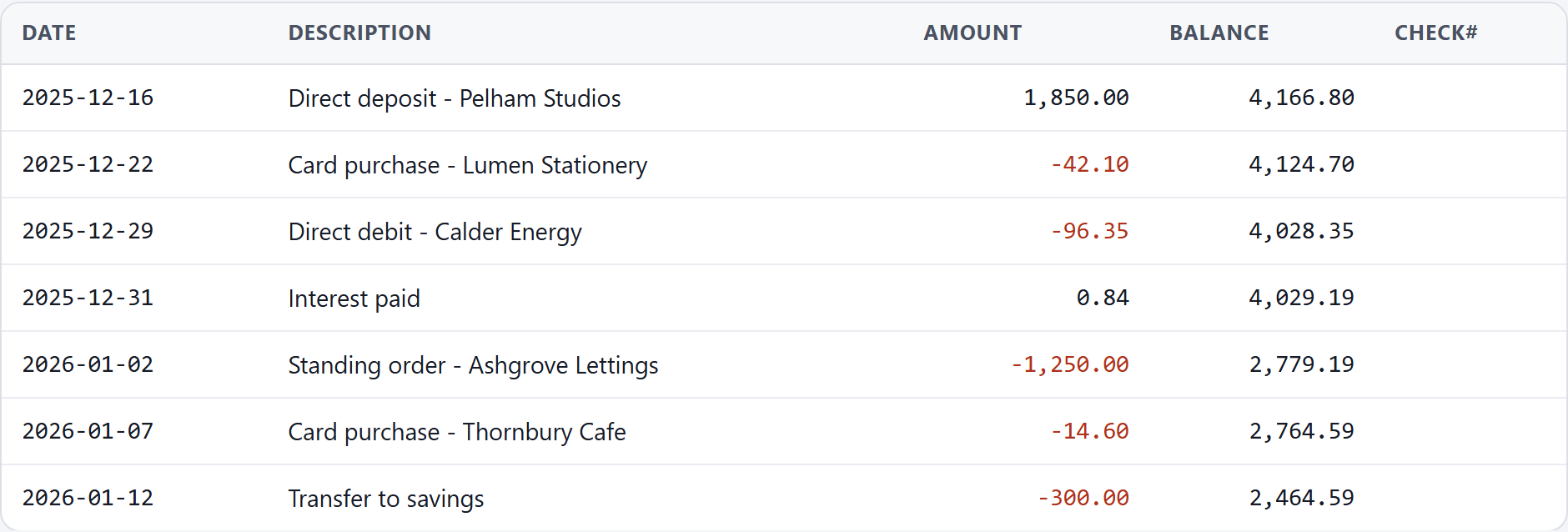
The line under the Download button reads 1 page · period 2025-12-15 to 2026-01-14 · dates read as month first (MM/DD). That is where the years came from.
Check it yourself
Find the period on the PDF. Note both ends.
Compare it with the line under the Download button. If it names the same period, or the statement date, the years came from it. If it names neither, the years came from elsewhere on the page — check every row.
Check the first and last dates. Every date has to fall inside the period.
Sort by date. December should come before January. If not, one group has the wrong year.
Do not rely on the balance check for this: a wrong year changes no amount, so a statement with every December row a year late still balances. Checking a converted bank statement CSV for errors covers what the sum does and does not see.
Not the same as Excel changing your dates
A wrong year in the CSV is a different problem from a spreadsheet changing a date as it opens the file — why Excel changes the dates in your bank CSV covers that one. To tell them apart, open the CSV in a plain text editor: if the year is already wrong there, the conversion did it; if the text says 2025-12-29 and the spreadsheet says otherwise, the spreadsheet did.
Convert a statement → Free, no account, and the PDF stays in your browser.
What this will not do
It will not find a period that is not printed: enter the first and last month under “Columns and date format” (one statement, twelve months at most), or correct the years in the CSV (the last question below says how).
Questions
Why does the balance check say OK when the year is wrong?
Because the check against the closing balance is a sum of amounts, and no amount carries a year: a statement with every date a year out adds up as well.
My statement prints the year on every row. Can this still happen?
Not from the period: a date that carries its own year keeps it. A two-digit year still takes its century from the period when one is printed.
Can I fix the year in the CSV?
Yes. The free CSV writes dates year first, as YYYY-MM-DD, so the year is the first four characters and a find-and-replace on the affected rows is enough — for example 2026-12- to 2025-12-. Use a text editor, so nothing else in the file is reinterpreted.
Next: why Excel changes the dates in your bank CSV, merge 12 months of bank statements into one CSV, and how to check a converted bank statement CSV for errors.