Why Excel changes the dates in your bank CSV (and how to stop it)
Published 23 September 2026 · by Tekiba
Because a CSV holds no formatting — only text — so something has to decide what each column means as the file opens, and that something is a setting on your computer. Microsoft says so: “When Excel opens a .csv file, it uses the current default data format settings to interpret how to import each column of data.” A statement printing 03/04/2024 offers two readings; the setting picks one. Three things end it: open through Data → From Text/CSV rather than by double-clicking, state the date column's order, and start from a CSV with only one reading. LedgerDrop writes YYYY-MM-DD.
Which dates are at risk
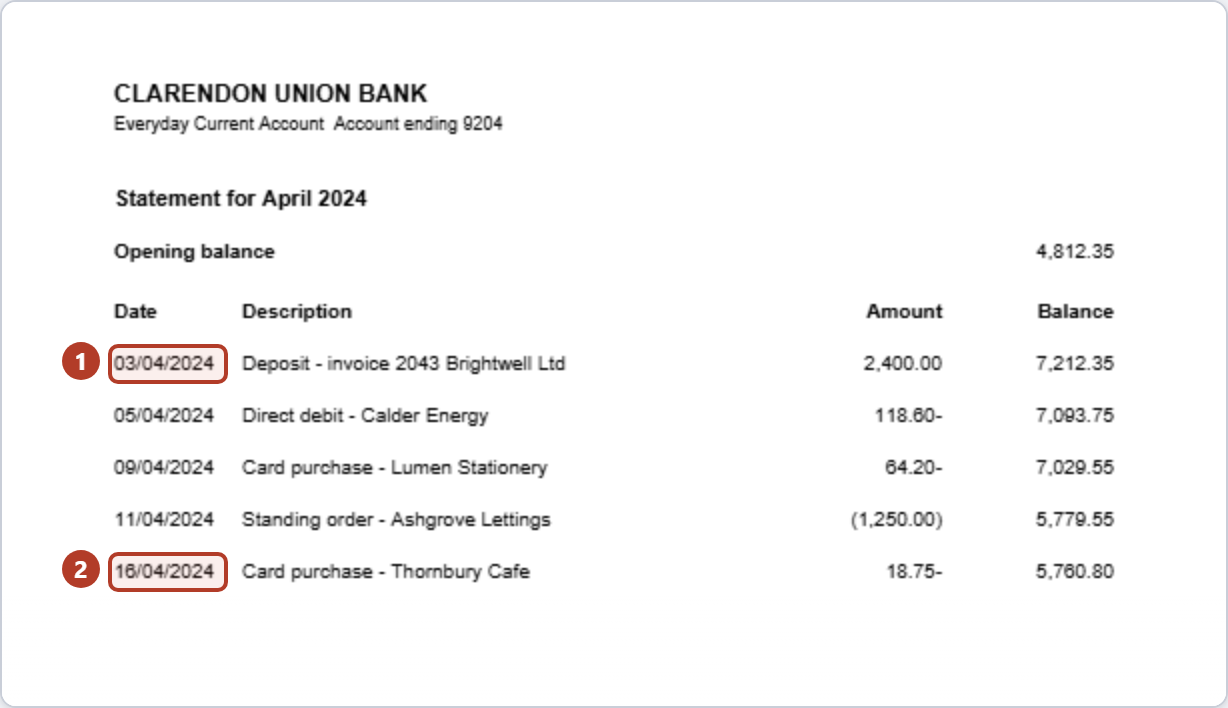
-
A date with two readings.
03/04/2024is the third of April day first and the fourth of March month first. Both are real dates, so the digits rule neither out, and a program that must produce one answer produces whichever its settings call for. -
A date with one.
16/04/2024has no second reading: there is no sixteenth month. It cannot be turned into the wrong day — which sounds like good news, and is why the damage gets missed.
Four of the eight dates above are of the first kind and four of the second. A date column can fail in patches rather than wholesale, and people report that it does — the question describing it on Microsoft's Q&A site says so in its headline: “date format changes from left aligned text to right aligned number if day is 12 or less”.
Why the sheet forgets your fix
Repair the column, save, close, reopen, and it is wrong again — not because the file lost your work but because it never had anywhere to keep it. A question on the same site describes the loop — a custom format applied, the file saved as CSV, the old spelling back on reopening — the answer being that the formatting was never part of the file.
Three ways to stop it
Do not open it by double-clicking. Opening is the path with no questions in it: every decision goes to the defaults. Use Data → Get & Transform Data → From Text/CSV instead, which previews the result. For the older wizard and its per-column controls, Microsoft says to “change the file name extension from .csv to .txt before you open it”.
Tell the date column what it is. In step 3 of the Text Import Wizard each column gets a data format, and the date order is yours to state: “If you select Date, select a date format in the Date box” — that box holds YMD, MDY and DMY. Or keep the digits untouched: “to convert a column of all number characters to the Excel Text format, select Text”. The choice is a request, not an instruction: “Excel imports the column as General if the conversion could yield unintended results”.
Start from a CSV with only one reading. Everything above overrides a guess; removing it is better. A year-first date does that:
2024-04-03can only be the third of April. A spreadsheet may still show it its own way, or leave it as text — what it lacks is a second reading to pick from.
What LedgerDrop writes
Converted in the browser:
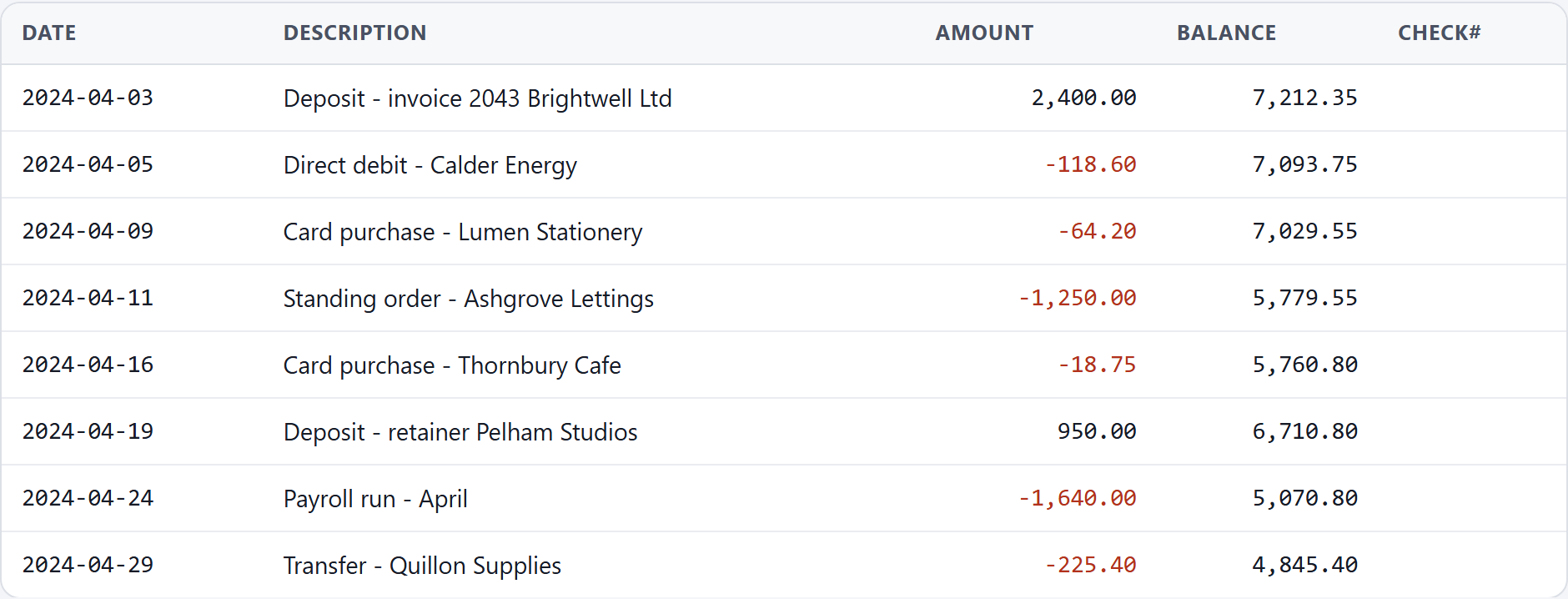
The dates are ISO 8601 — YYYY-MM-DD, year first — the free version's only spelling. The ambiguous ones were settled for the document rather than row by row: LedgerDrop counts the dates that can only be read one way and lets the majority decide. Four of these eight can only be day first and none only month first, so all eight are read day first. A row that can only be read one way is read that way whatever the count says; on a tie the rest fall back to month first.
Then the arithmetic: add the amounts to the opening balance and see whether you reach the closing one. Level means they add up to what the bank printed — not that each one is right, since two errors that cancel still balance, and nothing about a date, since a statement read a month out still balances. Checking a converted bank statement CSV for errors covers the rest.
Convert a statement → Free, no account, and the PDF stays in your browser.
What this will not do
It will not change your spreadsheet's settings: the region deciding how an ambiguous date is read belongs to your computer, not the file.
It will not put back a date already converted the wrong way: once 03/04/2024 is a stored date the ambiguous digits are gone. Go back to the CSV — one reason to keep it, alongside how far back you can download bank transactions.
And it will not tell you how your copy behaves. What is stated here about Excel is quoted from Microsoft's documentation and linked, from import or export text (.txt or .csv) files. The two links to Microsoft's Q&A site are people describing their own machines, not Microsoft describing the product: reports, not rules. This site does not test other products.
Questions
Why are only some of my dates converted?
Because, when a column is read in the opposite order to the one it was written in, only some rows survive the swap. A day of 12 or less is also a possible month, so those turn round into a date; a day of 13 or more is not a month, so there is nothing to turn them into. It is the kinder version of the problem: a half-converted column announces itself; one converted cleanly and wrongly does not.
Why did 03/04/2024 become 3 April, when my bank meant 4 March?
Or the other way round, depending on the machine — the digits do not say. What Microsoft documents is who chooses: opening a .csv, Excel “uses the current default data format settings to interpret how to import each column of data”, and the example given there is “the format of a data column in the .csv file may be MDY, but Excel's default data format is YMD”. Day against month is the same mismatch with different orders.
Does Google Sheets do the same thing?
It also has a regional setting, and there it belongs to the document rather than to the computer: Google's help says that changing a spreadsheet's locale and time zone “changes the spreadsheet's default currency, date, and number formatting”. Formatting is what that page covers; we have not tested how Sheets reads an ambiguous date on import. A date column with only one reading is what you can settle from your side.
Next: why “PDF to Excel” makes bank statements messy, should debits be negative in a bank CSV?, and the wrong year in a converted CSV.