How to check a converted bank statement CSV for errors
Published 16 September 2026 · by Tekiba
Do one sum before anything else: the opening balance printed on the statement, plus every amount in the CSV, should come to the printed closing balance — minus, on a credit card, where the amounts add to what you owe. LedgerDrop runs that sum both ways and shows how far off it is. Four faults account for most of what comes out wrong, and the sum sees only some of them: a negative amount read as a positive one moves the total, and page furniture in the table can; a day/month mix-up and a description attached to the wrong row never do, and have to be looked at instead.
Do the arithmetic first
In any spreadsheet: total the Amount column, add the opening balance, compare with the closing balance. On a credit card, subtract instead: a purchase is money out of your pocket, so a negative amount in the CSV, but it increases the balance the card prints — 100 opening and a purchase of −20 close at 120, not 80. LedgerDrop tries both directions and says which one landed.
It is the only check that notices a row which is not there — scrolling the rows that did come out never will. It is also a net total rather than an audit: two mistakes of the same size in opposite directions cancel out, and so do a missing debit and a missing credit of the same amount. A sum that lands means no single error survived it, not that the file is right.
Four things that go wrong
- Negative amounts written without a minus sign
- Money out is not always printed as
-1,800.00. Accounting notation puts a negative amount in brackets instead — the “accounting” currency format Unicode defines foren_USrenders −$3.27 as($3.27)— and a statement may equally use a trailing minus,1,800.00-, the bookkeepingDRandCR, or two columns, Withdrawals and Deposits, where the column carries the sign. Read only the digits and every withdrawal becomes a deposit, overshooting the total by twice the withdrawals. LedgerDrop reads all of those forms: on a fictional statement carrying brackets, a trailing minus,DRandCR, it returned −1,800.00, −149.00, −320.00 and +86.40, and the balance check came out level. - The day and the month the wrong way round
03/04/2026is 3 April in London and 4 March in Chicago, and nothing in the PDF says which. LedgerDrop decides from the whole file — one date with a number above 12 in it settles the order for every other date — and where no date does, it falls back to month first. The line under the row count says which reading it used, and Date order overrides it. The arithmetic cannot see this one: the same fictional statement read both ways passed the balance check both times, because dates never enter the sum.- A description that wrapped onto a second line
- A merchant address, or the rest of a long description, sits on its own line with no date and no amount, and where it belongs is a question about the layout rather than about the numbers. LedgerDrop attaches it to the row above by default — the best answer for all but one of the statements it is tested against, and that one prints the first line of a description above its date row, which is why Wrapped description lines belong to exists. Changing that setting on a fictional statement moved the text out of one transaction's description into the other's, with the row count and the balance check identical either way — a reading job, not an arithmetic one.
- Page headers and footers landing in the table
- The bank's name, the account line, “Page 2 of 3” and the small print typically repeat on every page, and a converter that treats every line as a candidate row pushes them into the CSV. LedgerDrop drops a line that repeats in the same place on at least 60% of the pages: a three-page fictional statement dropped twelve and returned six transactions, nothing else. What gets through is text printed once — a single marketing line in the description column joined the description of the row above it, with the balance check still level. That is the harmless version: a stray line moves the total only when it carries a date and an amount the parser can read, which is what would make it a row of its own.
Checking it in LedgerDrop
-
Read the balance check before the table. Convert the statement, and the panel above the rows says whether the opening balance, the transactions and the closing balance agree. A mismatch comes with a Difference, exact to the cent.
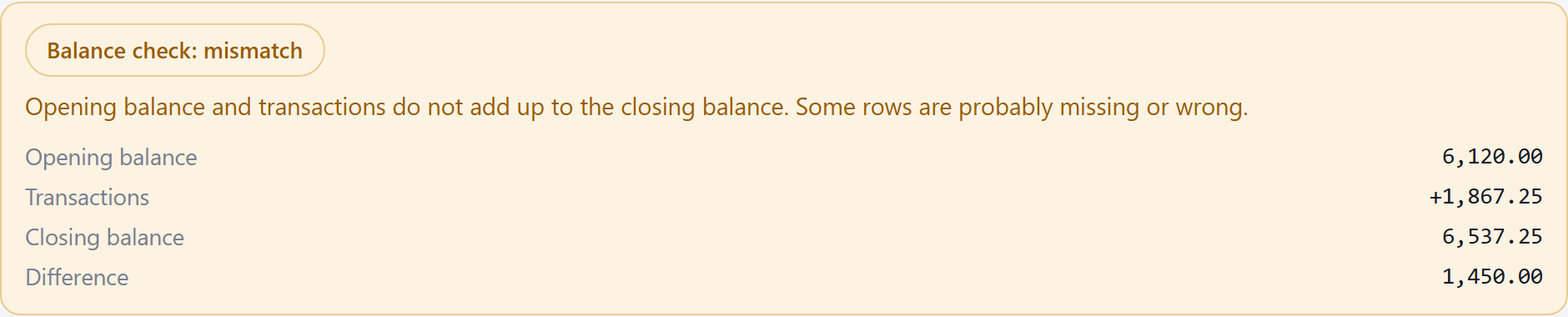
The statement here is fictional, built by the script that takes these screenshots; no real statement is used anywhere on this site. It fails on purpose: one amount is printed as a bare 1,450, and LedgerDrop counts a number as money only when it carries two decimal places or a currency symbol — the rule that keeps account numbers, cheque numbers and years out of the amount column. That row was left out, so the Difference is exactly its amount. -
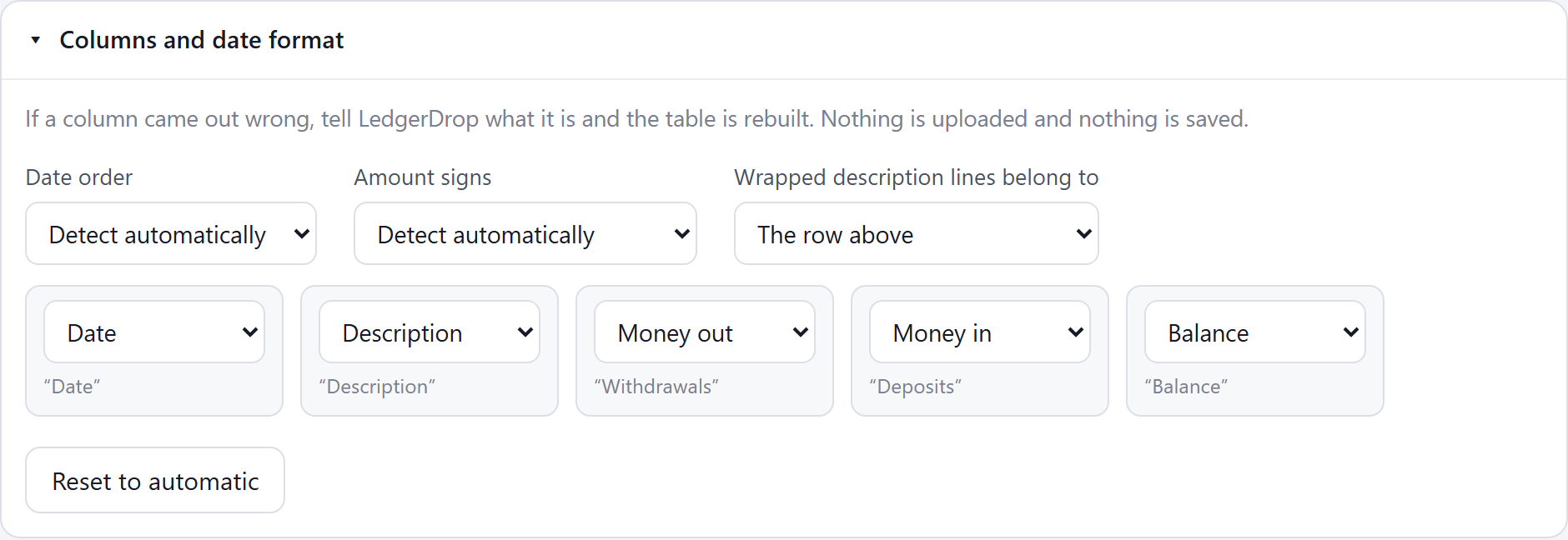
Open “Columns and date format” and correct what is wrong. Date order, the sign convention and where wrapped lines belong are all here, and every column found is listed under the heading it was read from, so one that came out as the wrong thing can be pointed at the right one. Each change re-runs the extraction against the PDF already in the tab; nothing is uploaded or saved.
-
Expect some files not to be fixable there. The one above is one: the columns were read correctly and the amount itself is unreadable, so no remapping brings the row back. You still know one row is missing and by how much, which is enough to finish the file by hand.
Convert a statement → Free, no account, and the PDF stays in your browser.
When it does not add up, suspect things in this order
- The Difference is exactly one row's amount. Find a row that size in the PDF and check whether it reached the CSV. A missed row is the likeliest cause and the quickest to confirm.
- It is twice a row's amount. That is the shape a wrong sign makes — but check the row against the PDF first, because a different row going missing lands on the same number. Converting a bank statement to CSV without uploading it covers which sign setting to reach for.
- It is roughly one page's worth of activity. Check whether a page of the file is a scan rather than text: one page of text carries the rest past the scan check, and those pages' rows are simply absent.
- The statement prints a running balance. Then the CSV has a
Balancecolumn, and the row where it stops tracking the statement is the row to look at. - None of the above. Count the rows in the PDF against the row count on the page. Slow, and conclusive.
Do you still have to read every row?
Not every row, but more than nothing. Three spot checks take about a minute between them: the first and last dates against the statement period, which is where a day/month swap shows; a handful of descriptions against the PDF, which is where wrapped lines and stray page furniture show; and a few amounts you recognise, because offsetting errors slip past a net total. Sampling is not proof — a pair of errors that cancel can survive both the sum and the sample — so how far to take it is a judgement about what the file is for. Either way it works on a CSV from any converter, which is more than a tool's claim about its own accuracy can do.
Questions
Why are negative amounts showing as positive?
Because the minus sign was not where the converter looked: a statement may mark money out with brackets, a trailing minus, the letters DR and CR, or a separate Withdrawals column. Credit cards invert the convention entirely, printing a purchase as positive because it increases what you owe. LedgerDrop reads the first four, and flips the card convention when the page reads like a card statement and the rows contradicting their own section heading clearly outnumber those that agree. Amount signs settles it by hand.
Why are the dates wrong, with the day and month swapped?
A date printed as 03/04/2026 carries no clue about which number is the month, so it is inferred from the rest of the file: one date with a number above 12 in it decides the whole statement. Where no date does, LedgerDrop falls back to reading the month first. The line under the row count says which way it read them, and Date order changes it.
Do I still need to check the CSV row by row?
Not row by row. The balance check is exact to the cent and it is what finds a missing or misread amount, which is the expensive thing to find by eye. What it cannot see is a date read the wrong way round, a description on the wrong transaction, or two errors that cancel — a missing debit and a missing credit of the same size pass it untouched. Checking the first and last date, a few descriptions and a few amounts you recognise samples for those; it does not prove they are absent.
Before the checking comes the converting: convert a bank statement to CSV without uploading it, and is it safe to upload bank statements? For the months your bank will not export, how far back you can download bank transactions as CSV; for why the columns moved in the first place, why “PDF to Excel” makes bank statements messy. For which way round the amounts should be, should debits be negative in a bank CSV? And for the period, the totals and the row count before an import, reconcile a bank statement before you import it.