Why “PDF to Excel” makes bank statements messy
Published 21 September 2026 · by Tekiba
Because there may be no table in the file. PDF can mark one up — the specification defines tagged rows and cells — but a page without those tags holds only characters and their positions, as the statement here does. With only positions to go on, four ordinary things move a column: a date that could be read either way round, a description that wraps onto its own line, a negative amount printed without a minus, and lines that repeat on every page. What tests the result is a number the statement already prints: add your rows to the opening balance, and if you do not reach the closing balance something was read wrong. Two errors that cancel still balance: a check, not a proof.
The four places a statement moves
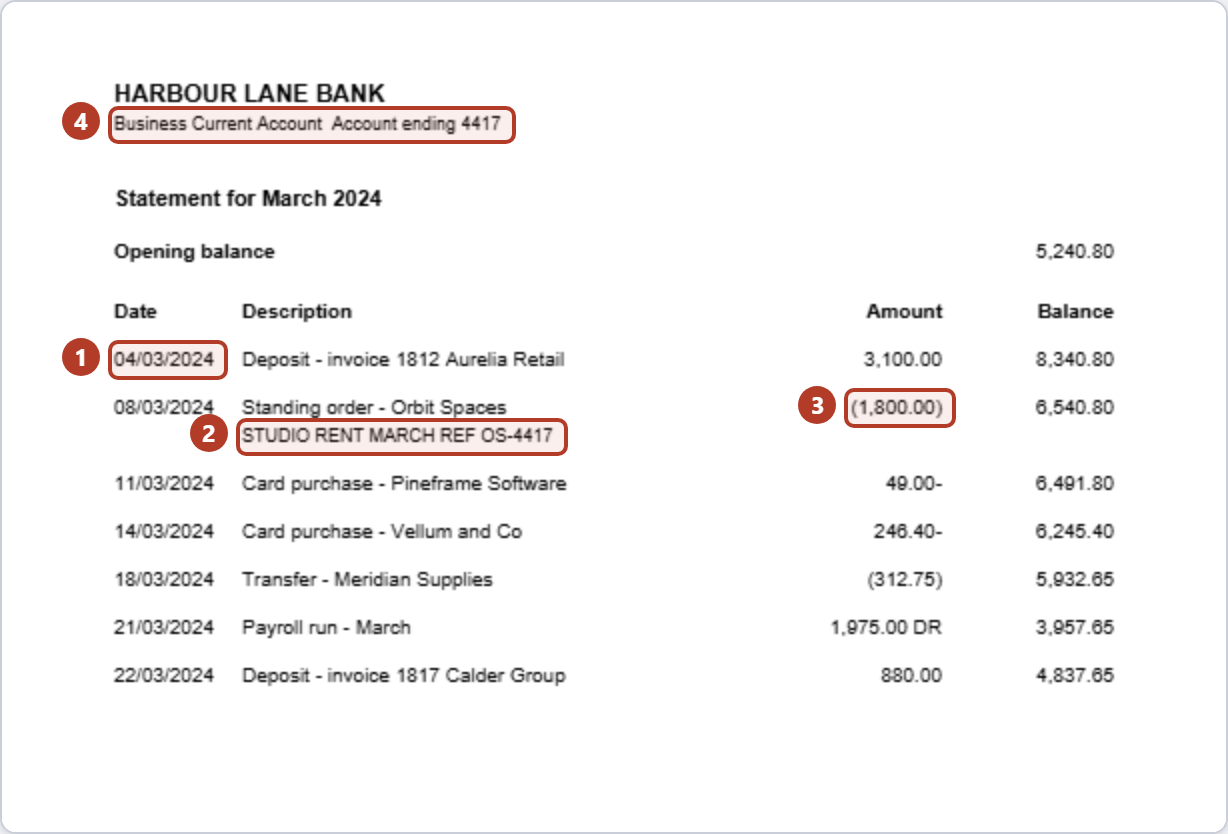
-
A date that could be either way round.
04/03/2024is the fourth of March or the third of April. LedgerDrop settles it once for the document by counting: above twelve in front can only be day-first, above twelve second only month-first, and the majority sets the order for the whole file. Seven of the ten transactions in the two-page example can only be day-first and none the other way, so04/03/2024is 4 March. Level, or with neither present, it falls back to month first. -
A description that wraps.
STUDIO RENT MARCH REF OS-4417sits on its own line with no date and no amount: by position a row, by meaning part of the row above. LedgerDrop attaches it upward by default; the Columns panel moves it down. -
A negative that is not a minus sign. The statement above prints money out as
(1,800.00),49.00-,(312.75)and1,975.00 DR. Read as plain digits they are all positive, and a column of positive numbers still looks like a column. LedgerDrop treats brackets, a trailing minus and a DR as negative. -
Lines that repeat on every page. The bank name, the account line, the page number, the small print: furniture, not transactions, and on a multi-page statement it lands mid-table. LedgerDrop drops a line repeating in the same place on at least 60% of the pages.
Why it happens at all
A PDF page is a list of drawing instructions: ISO 32000-1 gives it a way to draw a character at a position, and a statement is a few hundred of those. Without table tags the visible table is a coincidence of those positions. LedgerDrop rebuilds it by grouping characters that share a line into a row and what shares a vertical band into a column. The four things above work against that in two ways: a wrapped line and a repeated header spoil the grouping, while a date order and a sign spelling leave what has been grouped open to more than one reading.
Which is why a converter written for statements can do better without being cleverer: it knows what to expect, and can test its own work against the printed balances.
Fixing one by hand
Get the rows right first. A line with no date and no amount may be a wrapped description, a section heading or page furniture, and some statements wrap onto the next transaction rather than the previous one — look at the PDF before moving it. Delete the repeated headers and footers; until then, everything below is out by a row.
Then the signs. Turn brackets, a trailing minus, and DR or CR into one signed number per row — before any arithmetic, or the total is built from numbers pointing the wrong way.
Then the dates. Set the column's type explicitly rather than let it be guessed, and decide day-first or month-first once for the column, checking the first and last against the statement's period.
Then add the amounts to the opening balance and compare with the closing balance. That sum catches a dropped row or a sign left the wrong way round — not a date, not a description, not two errors that cancel.
What the converter does with the same file
Given that statement, LedgerDrop returned this:
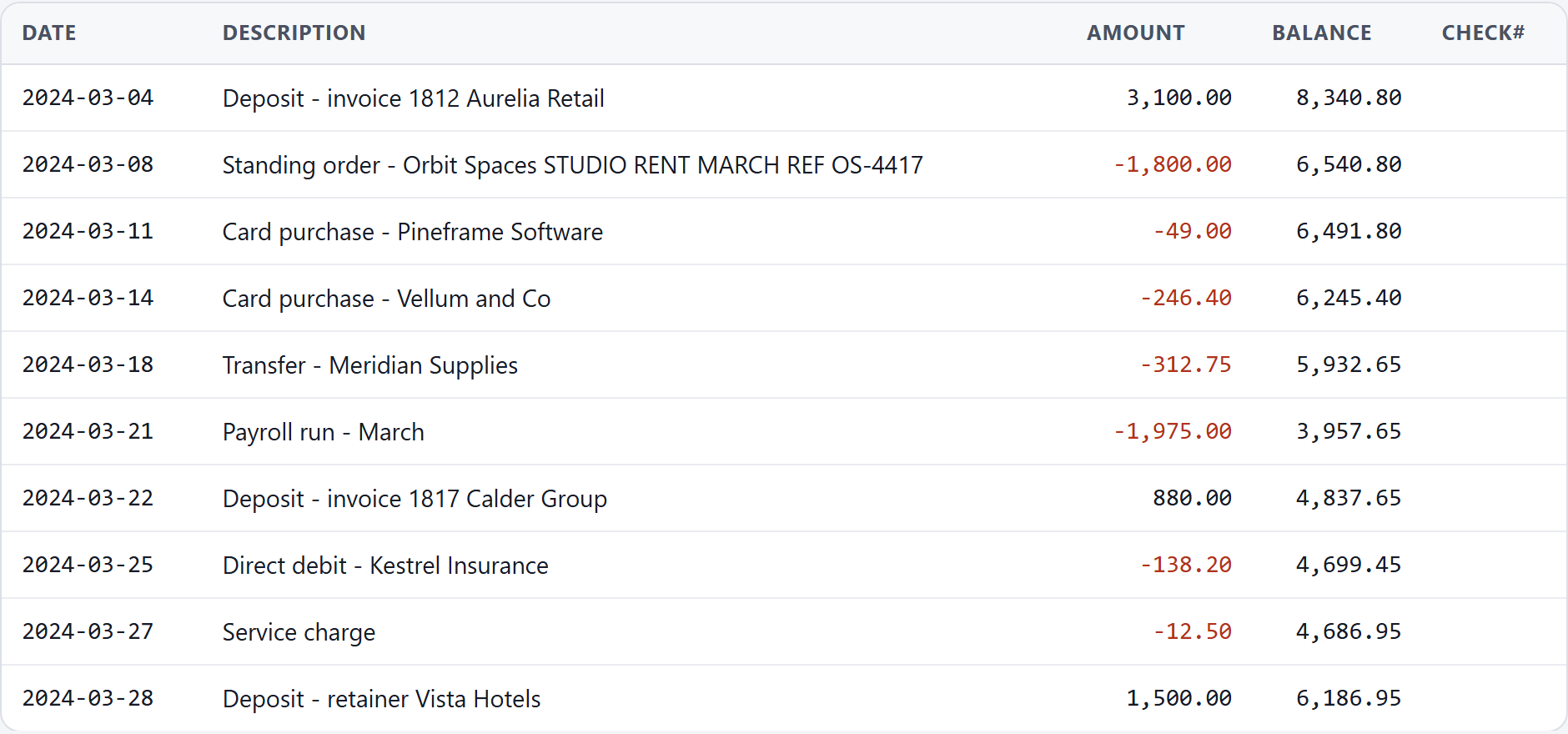
The balance check matters more than the table: exact to the cent, it catches a dropped row or a misread amount — though not two that cancel. The rest is the subject of checking a converted bank statement CSV for errors.
Convert a statement → Free, no account, and the PDF stays in your browser.
What it will not do
It will not read a scan. LedgerDrop refuses a file averaging under a hundred characters a page rather than hand back an empty table: it does not do OCR. Because that is an average, a partly scanned file can pass and come back short. Three ways to check whether a statement PDF is scanned or text takes a minute.
It has not been written for every bank's layout. When it does not recognise the headings it says so and offers the columns it found, for you to name — a fallback, not a promise.
And the check is arithmetic, not meaning: level says the amounts add up to what was printed, not that a description is on the right transaction.
Questions
Why are my negative amounts positive?
One thing to look at is whether the minus was ever a minus: money out can be printed as brackets round the number, as a minus after it, or as a DR beside it — all three appear in the example above — and anything reading the digits alone gets a positive number from each. The sign is on the page, but only until the column becomes numbers.
Why did the date column come out wrong?
If the day and the month were settled row by row rather than once for the document. 04/03/2024 alone is ambiguous, and a row-by-row reading can put half a statement in March and half in April. Settle it from the whole file instead: count the dates that can only be read one way and let the majority decide. If the two sides come out level, or none can, nothing in the file settles it — LedgerDrop falls back to month first, and the statement's own period is the evidence left.
Is a spreadsheet's built-in “get data from PDF” any better?
It meets the same page: with no table tags there are only positions to reason about, so the same four things are the ones to check. Whether it copes with a particular statement only trying it will tell you; this site does not test other products. The check at the end is the same either way — add the amounts to the opening balance and see whether you reach the closing balance, remembering that two that cancel will still balance.
Next: convert a bank statement to CSV without uploading it, why Excel changes the dates in your bank CSV, should debits be negative in a bank CSV?, and how far back you can download bank transactions.