Is your bank statement PDF scanned or text? Three ways to check
Published 16 September 2026 · by Tekiba
Try to drag-select a line of the table. If the words highlight, the PDF holds real text and a converter can read it. If the drag highlights nothing, the page is a picture — a scan or a photograph — and every tool without OCR, LedgerDrop included, will refuse it or hand you an empty table. Two other checks say the same thing: searching for an amount that is printed on the page, and looking at whether the file names any fonts. A statement downloaded from online banking is normally the text kind.
Three ways to tell
-
Drag across a row. Put the cursor at the start of a transaction line and drag to the end of it. Text highlights word by word; an image gives you nothing, or a rectangular marquee if your viewer has one. This is the quickest check and the one that is hardest to misread.
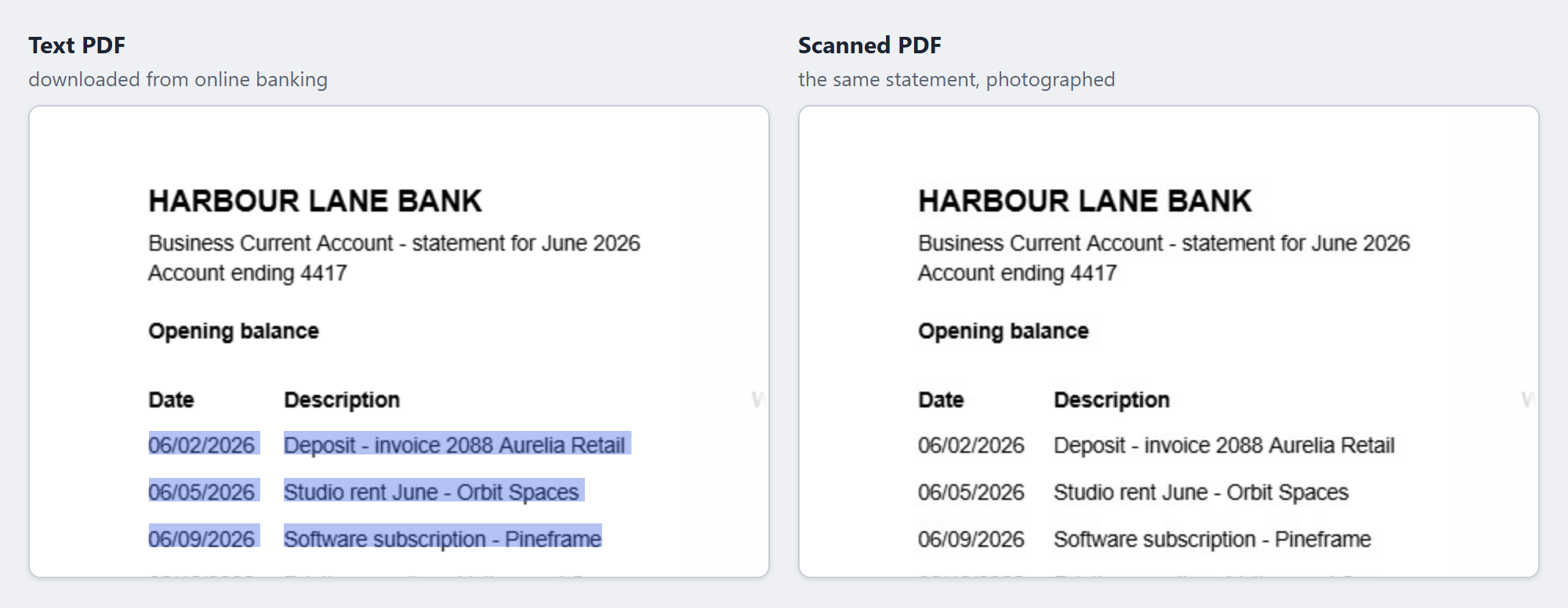
The same fictional statement twice, rendered by pdf.js with each page's own text laid over it, as a PDF viewer does. The right-hand file is a real image-only PDF — the left one rendered to a picture and wrapped back up — and each panel was dragged across in turn. No real statement is used anywhere on this site. -
Search for an amount. Press Ctrl+F, or ⌘+F, and type one of the amounts printed in the table, exactly as it appears. A match means there is text — though not necessarily good text, since a scan put through OCR somewhere else will match too, carrying whatever the recognition got wrong. A failure is a strong hint rather than a verdict: some text PDFs store their characters in a way that defeats a search for the string you can see. Go back to the drag if the search comes up empty.
-
Look at the fonts. A PDF that holds text has to say which fonts it draws it with, and a viewer that can list a document's fonts will show them. An image-only file lists none: the two files above differ by exactly that, two font entries against none. An empty font list is as good an answer as the drag.
Why a scan cannot be converted
A PDF page is a list of drawing instructions, and ISO 32000-1 — the PDF specification — gives it two quite different ways to put a statement on the page. One draws characters, with fonts and positions; the other paints a picture. When the page was generated from the bank's own records, the amounts are there as characters, and reading them back is arithmetic on coordinates. When the page was scanned, there is one image and nothing else: the digits exist as ink, not as numbers.
Turning that ink back into characters is optical character recognition, and it is a different job with a different failure mode — it guesses, and a guessed digit in an amount column is worse than no amount at all. LedgerDrop does not do it, which is why it stops rather than trying.
What LedgerDrop does with one
It counts the characters in the file before it goes looking for a table. Fewer than a hundred per page, averaged over the whole document, and it treats the file as a scan and says so instead of returning an empty table:

Because that is an average, a mostly-scanned file can slip through. A three-page statement whose first page is text and whose other two are images passed the check when page one carried 358 characters, and converted — returning that page's five rows and nothing from the other two. The balance check came back unknown, the closing balance having been printed on a page it could not read. The same file with a thinner first page, 208 characters, was refused as a scan.
Convert a statement → Free, no account, and the PDF stays in your browser.
Getting a text copy instead
Download the statement again from online banking rather than working from what was scanned or emailed. A PDF the bank generates from its own records is text; a scan is what happens after somebody prints one and puts it through a machine. Statements that arrive as an email attachment are usually generated the same way, so they are usually fine too.
Printing to PDF from the bank's own web page often gives a text file as well, because a web page is text to begin with — but it depends on what is being printed and on the browser, and printing a document that is already a scan just produces the scan again. It is worth a try before OCR, not a sure fix.
A statement whose text passes these checks but still will not let you copy from it, or will not combine with others, is a different problem: the text is there, and a permissions password may have switched those operations off. Why your bank statement PDF won't let you copy, merge or convert covers that one. If it will not open at all without a password, see bank statement PDF asks for a password to open.
Questions
Why can't I select text in my bank statement PDF?
Almost always because there is no text in it: the page is an image of a statement, from a scanner, a phone camera or a fax, and a drag has nothing to catch on. The file will usually be larger than a text statement of the same length, and the characters may look slightly soft or speckled when you zoom in. A page can also carry an invisible text layer added by OCR, in which case the drag works but the words you get back are the recognition's best guess rather than the bank's.
Are scanned statements harder to convert to CSV?
They need an extra step that text statements do not: recognition has to invent characters from the shapes before anything can parse them, and the errors it makes land in the digits. Adding up the transactions against the printed balances does catch a single misread amount — but only when the balances themselves were read correctly, and OCR is as able to get those wrong as anything else. Tools without OCR — LedgerDrop among them — stop at the door instead.
Why is my converted CSV empty or garbled?
A scan handed to LedgerDrop does not give you an empty CSV, because it stops first. An empty or odd table means something else: headings the parser did not recognise, in which case it says so and offers the columns it found from the layout; a statement whose pages are partly scanned, where you get only the pages that carried text; or amounts printed in a way it does not count as money. Checking a converted CSV for errors covers how to tell which.
Once you have a text statement: convert a bank statement to CSV without uploading it, and is it safe to upload bank statements? Working through old months, how far back you can download bank transactions as CSV says which ones you will have to get this way, and why “PDF to Excel” makes bank statements messy covers what happens to a text one in a general converter.